Everything your business needs, in one place.
Teknetik HQ is one workspace in your browser, in your own brand. Your brand, website, pictures, print, adverts, posts, email, customers, phone, documents, job packs and shop are together, and an assistant that knows your business works across all of them.
 Kettlewell & Moss
Brand
Explore Brand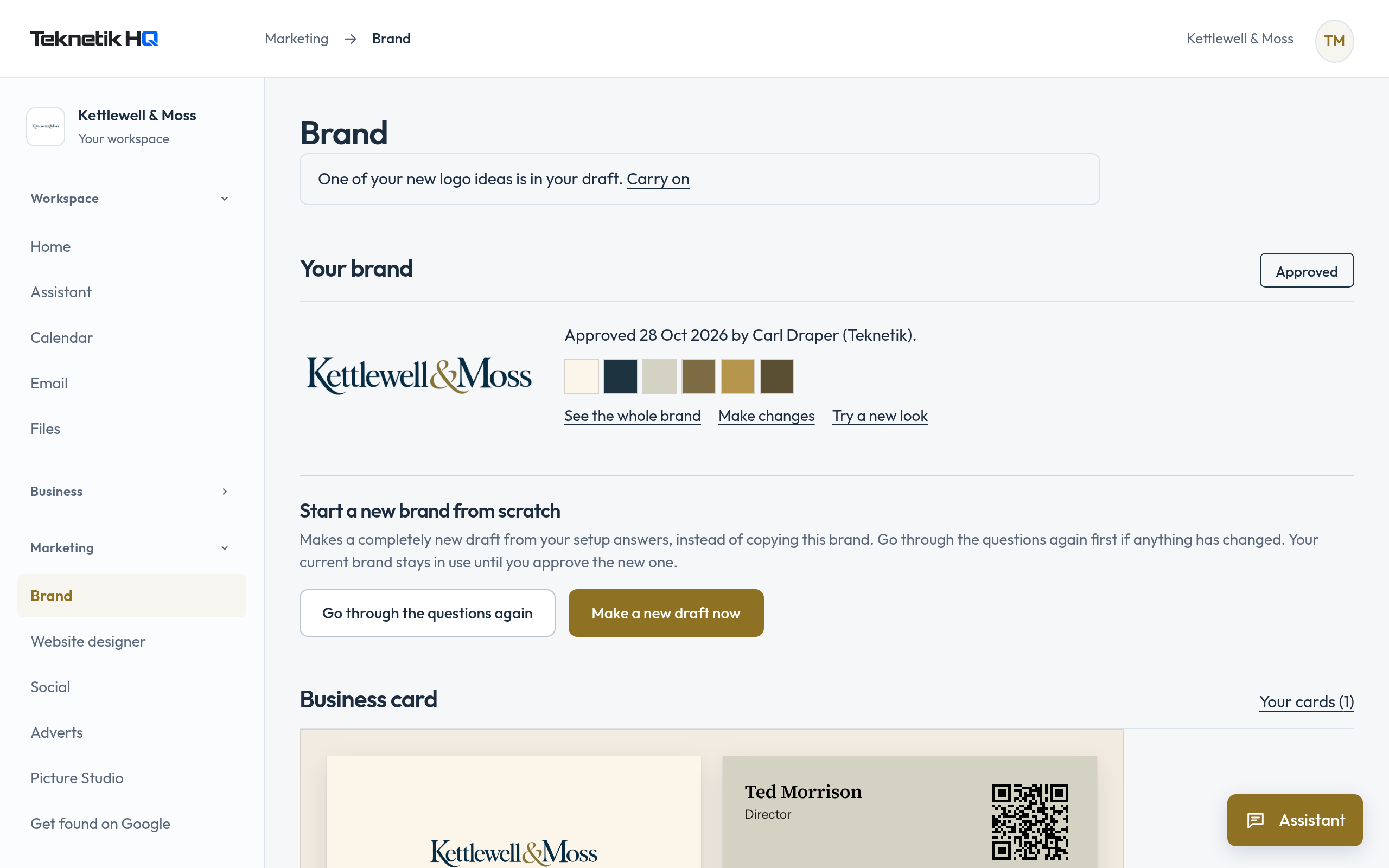
Brand. A proper logo, colours and type that everything else is made from, so everything you send out looks like it comes from the same business. Read more about Brand
Kettlewell & Moss is a sample business. Select a tool to preview its page.
One screen, not six websites
Six logins and a folder of pictures don’t add up to a business that looks and runs as one. HQ brings them together.
It wears your brand.
Your workspace uses your colours and logo, and so does everything it makes: the website, the posters, the posts, the quotes and the emails. Approve your brand once and everything matches.
How the brand worksEvery tool has its place.
Clear navigation keeps your tools together. Open the page you need and move between your customers, quotes and files from one place.
See every appThe assistant knows your business.
It drafts documents and quotes, keeps your customer records up to date and finds help when you are stuck. It proposes; you say yes.
What the assistant does

Every tool in HQ
Each one is made from your brand and works with the others, so an enquiry from your website, a call to your phone and a quote in Office all end up with the same customer.
Look the part
- BrandA proper logo, colours and type that everything else is made from, so everything you send out looks like it comes from the same business.
- WebsiteA website made from your brand that you change yourself, by pointing at the part you want different and saying what you want.
- PicturesPictures for your posts, posters and website, drawn from a description in your own words, then changed until they are right.
- PrintBusiness cards, posters, menus, price lists, gift vouchers and letterheads made from your brand, sent straight to the printer and delivered to you.
Win the work
- AdvertsShort video adverts for social media, made from your brand and your photos, without hiring anyone.
- SocialA month of posts planned, written and pictured, approved by you in one sitting, then posted on schedule.
- EmailNewsletters and offers in your brand, sent to the customers who agreed to hear from you, with the replies landing in Customers.
- CustomersA proper CRM: companies, contacts, enquiries, opportunities, quotes, tasks and documents linked together, with the replies drafted for you.
- PhoneAn assistant on your own number that answers the calls you cannot take, books the job and rings customers back to confirm or remind them.
Powered by Telnyx: calls run on Telnyx’s global voice network.
Run the day
- OfficeWord and Excel in your browser, with letters, quotes and price lists on your letterhead and an assistant beside the page.
- Job packsRAMS, COSHH assessments and safety checks for every job, made from your method statements and the products’ safety data sheets, and approved by a named person.
- ShopSell your products from your own website, with prices, stock, checkout and payments in the same place as everything else.
- FilesEverything HQ makes for you, filed in one place: logos, posts, adverts, posters, pictures and documents.
Know your business
Four things HQ never does
The same four rules in every app, whoever is using it.
Post, send or publish without your yes
Every post, email, reply, quote and change to your website waits for a person to approve it.
Order or spend without asking
Printing, and anything else that costs money, waits for you to say yes.
Invent facts about you
The assistant writes from the facts you have confirmed. If it doesn’t know something, it asks.
Pretend to be a person
The phone assistant tells every caller it is an automated assistant.
Who HQ suits, and who it doesn’t
It is made for owner-run businesses: salons, trades, coatings firms, training providers and small shops.
HQ probably suits you if
- You run a business of one to twenty people and do the computer side yourself.
- Your logo is a JPEG, your website is out of date, or your Facebook page has gone quiet.
- Enquiries reach you by phone, email, the website and Facebook, and some slip through.
- You would rather check a draft than write from a blank page.
Probably not if
- You have an agency you are happy with for your brand and website.
- You want things sent or posted without anyone checking. HQ always waits for a yes.
- Most of your work is advice a qualified person must give. AI is the wrong tool for that part, though HQ can still look after your brand and paperwork.
Need something HQ doesn’t do? We build it with you
An extension is a new tool in your workspace, made from your brand and joined to your customers and files. Job packs started that way, built with a coatings contractor, and is now part of HQ for every trade.
Questions about HQ
Do I need to install anything?
No. HQ runs in your browser, with clear navigation and the same tools on your computer, tablet and phone.
Do I need my own logo first?
No. If you have one, even as a photo of the sign, we start from it. If you don’t, your brand draft includes one.
Can my staff use it?
Yes. Each person has their own login, and they work in the same business workspace.
Do I have to use every app?
No. Everything starts from your brand, so we make that first with you. After that, open the apps you need and leave the rest.
What does the assistant know about us?
What you have confirmed: your business profile, your approved brand, the facts from your setup and the history in HQ. It doesn’t make up what it doesn’t know.
Get early access to Teknetik HQ
Tell us about your business. We set HQ up with you, starting with your brand, and your workspace is ready to use.