
Open n8n for the first time and it is easy to see a wall of nodes, lines, expressions, credentials and unfamiliar terms. For an owner already stretched thin, closing the tab and going back to spreadsheets can feel like the sensible choice.
That reaction is understandable. But the apparent complexity is not the whole story. n8n is a flexible way to make the systems a business already uses pass work between one another. The important question is not whether somebody can master every feature. It is whether one recurring operational problem can be turned into a reliable, controlled workflow.

Start here
What n8n actually is
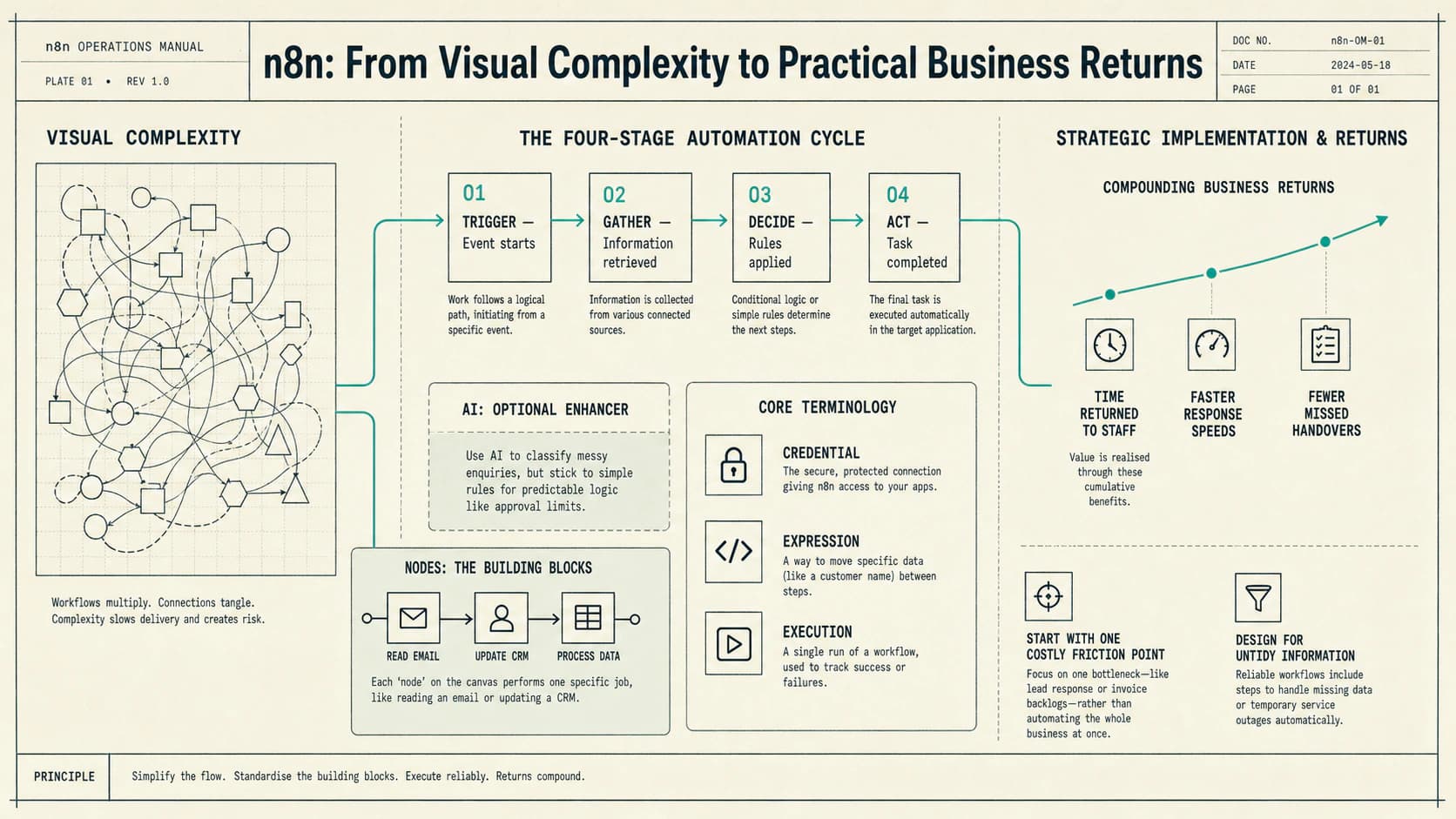
n8n (pronounced “n-eight-n”) is a visual workflow automation platform. It connects business applications and moves or changes data between them. You build a workflow by placing steps, called nodes, on a canvas and joining them in the order the work should happen.
It is helpful to think of n8n as a co-ordinator behind the scenes. It does not replace the CRM, inbox, accounting system or calendar. It listens for something to happen in one system, follows agreed rules and then completes the next steps in the other systems.
A form, email, booking, schedule or webhook starts the work.
Relevant information is retrieved from connected systems.
Rules route the work; AI can help with suitable messy inputs.
A record, message, task or alert is created and logged.
The terms that make the canvas easier to read
- WorkflowThe complete process, from the event that starts it to the final action or handover.
- NodeOne step in the process, such as reading an email, looking up a contact, checking a condition or updating a record.
- TriggerThe event that begins a workflow. It might be a new form response, a timed schedule or information sent by another system.
- CredentialThe protected connection that gives the workflow agreed access to an application or service.
- ExpressionA way to use information from an earlier step, such as placing a customer's name in a message or passing an order number to another system.
- ExecutionOne run of the workflow. Its history helps the person responsible see what completed, what failed and why.
n8n can be used as a managed cloud service or run on infrastructure chosen by the business. Self-hosting offers more control, but it also creates responsibility for updates, security, backups and availability. The right option depends on the organisation's requirements and technical capacity, not on which one sounds more advanced.
AI is optional. An AI step might classify an enquiry, extract information from a varied document or prepare a draft. Predictable decisions—such as whether an invoice exceeds an approval limit—are usually better handled with an ordinary rule. A sound workflow uses the simplest dependable method for each step.
A practical example
From missed call to owned follow-up
Imagine a service business where calls are often missed while the team is with customers. The operational problem is not the telephone itself. It is that the caller waits, the context is incomplete and follow-up depends on somebody remembering.
An n8n workflow could:
- receive a missed-call event from the telephone service;
- look for the number in the customer system;
- send an agreed acknowledgement asking for the minimum useful information;
- create or update the contact and assign a follow-up task;
- alert a person immediately when the caller is an existing priority customer or the message suggests urgency; and
- record what happened so the call does not disappear.
The workflow is visible as connected nodes. Each node has a limited job, and the lines show how information moves between them. The person designing it can test each stage before the workflow handles live calls.
n8n is the co-ordinator, not the outcome. The outcome is a faster, more consistent response with a clear owner.
The same pattern can support lead handling, invoice preparation, booking administration, customer onboarding, internal reporting and other work that currently crosses several tools and relies on manual handovers.
The first impression
Why n8n feels more complicated than simpler tools
Some automation products offer a short list of tightly constrained actions. n8n gives the designer more control over branching, data transformation, error handling, application connections and custom logic. That flexibility creates more decisions on screen.
The difficult parts usually sit around the canvas:
- deciding which event should start a process and preventing duplicate work;
- matching inconsistent fields between an inbox, spreadsheet and business system;
- granting enough access for the workflow to work without granting more than it needs;
- dealing with incomplete information, unavailable services and unusual cases;
- choosing between cloud and self-hosted operation; and
- adding AI prompts, model choices and guardrails only where they serve the process.
These are not decorative technical details. They are the real conditions of the business process. Hiding them may make a demonstration look cleaner, but it does not make a live workflow dependable.
Implementation
What the right help changes
Experienced implementation starts with the bottleneck, not with a tour of the software. A slow lead response, an invoice backlog or repeated customer questions gives the work a clear purpose and a way to judge whether it improved.
Keep the first version narrow
A sensible first workflow handles one defined route well. It has approval points for important actions, clear notifications when something fails and a manual fallback. More cases can be added after the basic route is understood and trusted.
Design for exceptions
Real information is untidy. Names are missing, files arrive in the wrong format and systems become temporarily unavailable. Good implementation decides what should stop, what can retry and what needs a person before those situations occur.
Leave the business able to own it
Secure connections, meaningful workflow names, useful monitoring and plain documentation are part of the result. A named person should understand what the workflow does, which decisions it may make and how to pause it safely.
The business case
Where the returns come from
The return does not come from the number of nodes on the screen. It comes from removing avoidable handling, waiting, rework and missed follow-up from a process that matters.
- Time returnedRepeated copying, sorting and routine preparation take less staff attention.
- Faster responseEnquiries are acknowledged, enriched and assigned without waiting for somebody to check another system.
- Fewer missed handoversTasks, reminders and records are created as part of the process rather than relying on memory.
- More consistent workAgreed checks happen in the same order while unusual cases remain visible to a person.
- Better use of existing toolsThe business can join up systems it already relies on instead of immediately replacing them.
Measure the starting point before building: handling time, response delay, incomplete records, exceptions or work left open. Review the same measures after a controlled pilot. This turns “automation might help” into a decision based on the operation, without relying on borrowed savings figures.
Explainer video
See the workflow take shape
This nine-minute explainer follows the n8n canvas from the operational problem and connected systems through to dependable implementation and practical business returns.
A proportionate choice
When n8n is—and is not—a good fit
n8n is worth considering when a recurring process crosses several systems, needs branching or data preparation, and would benefit from visible control over how each step works. It can be particularly useful when a business wants the option to combine ordinary rules with carefully governed AI.
It may be more platform than the problem requires when a single application already includes a reliable feature for the task, or when a very simple two-step connection solves the problem well. It is also a poor first move when nobody owns the process or the team cannot yet agree how the work should happen.
The learning curve is real, but learning every feature is not the goal. Start with one costly point of friction, understand the route through the work and build only what is needed to improve it. With the right scope and support, the intimidating canvas becomes something much more useful: a clear picture of a process the business can run, observe and improve.
For a technical overview of the platform, visit the official n8n documentation.