
Conversations about automation often jump straight to AI agents and ambitious new platforms. Meanwhile, a business owner is still digging through email for a signed document, checking three calendars or trying to remember which photograph belongs to which job.
Connecting Google Drive, email and calendar will not sound as dramatic as introducing an autonomous system. It can still make a meaningful difference. These everyday tools already contain much of the information needed to organise work. A well-designed connection helps that information arrive in the right place at the right moment.

The basic idea
What a connector actually does
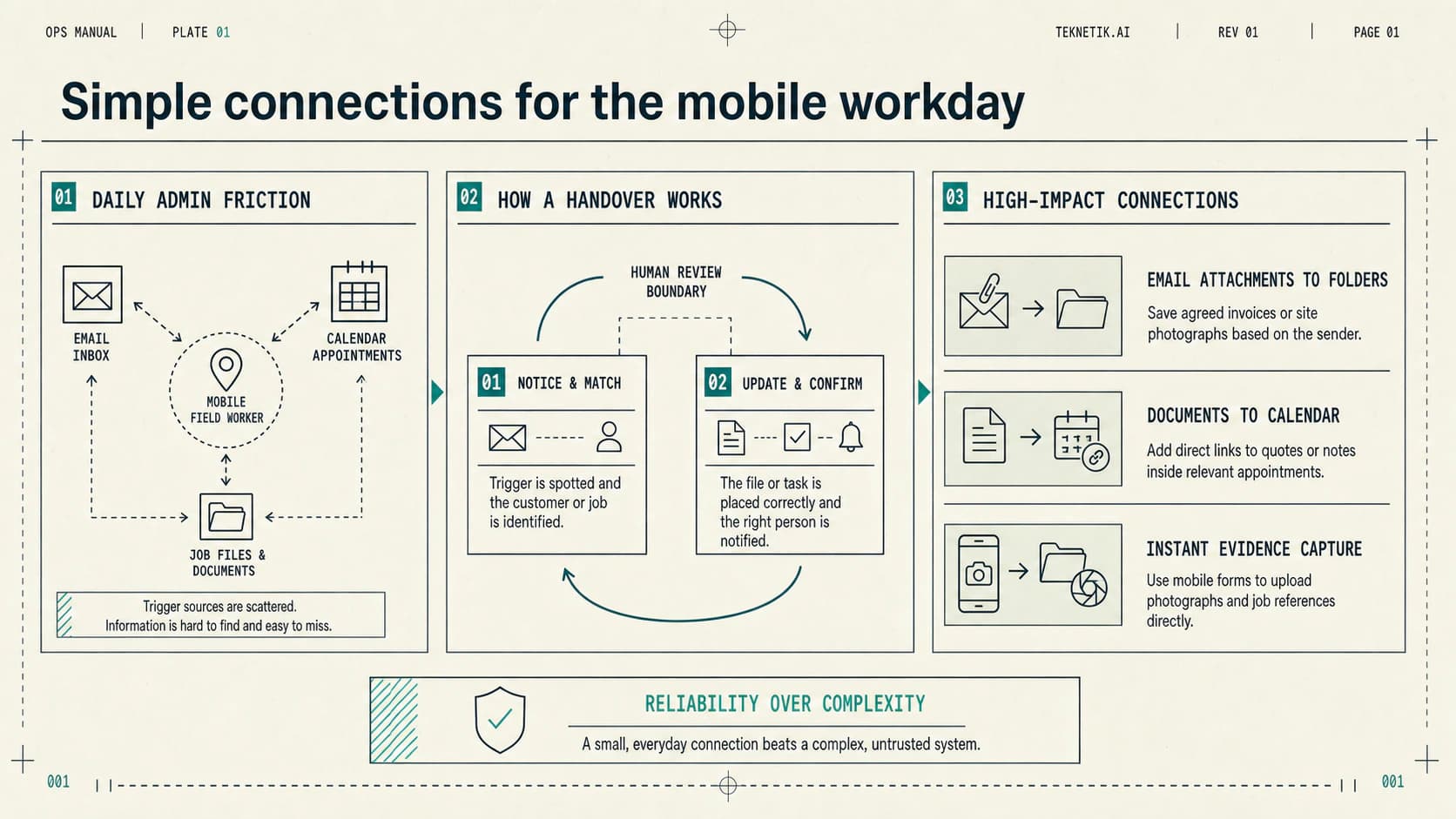
A connector is a permissioned link between applications. It allows an automation tool to notice an agreed event in one place and take a defined action somewhere else. The useful work sits in the small handover between the two.
An email, booking or file upload starts the workflow.
A customer, job or reference identifies where it belongs.
The file, event, message or task is placed correctly.
The right person can see what completed or needs attention.
For example: an appointment is confirmed, the workflow uses its job reference to find the matching Drive folder, and a link to that folder is added to a preparation message. The owner has not adopted another place to check. The calendar they already use has become a better route into the work.
The connection might be provided by an existing feature, configured through a light automation service or built as part of a more flexible workflow. The technology matters less than the reliability of the handover.
Work on the move
Fragmented time makes small obstacles expensive
A plumber finishing a job needs the customer's previous quote. A consultant leaves a meeting and needs to record the agreed next step. A contractor is asked for the latest proposal while standing on site. None is a large task, but each requires the person to stop, search and rebuild context.
That friction is amplified when the day is divided into short windows and the phone is the main device. The owner may have limited signal, one free hand and ten minutes before the next appointment. A process designed around a quiet desk and several open tabs will not travel well.
Good mobile automation reduces the number of decisions and searches required now; it does not simply move more admin onto a smaller screen.
Useful handovers
Five simple connections worth considering
The details will differ between businesses, but these opportunities are common because they connect information the team already receives with work that already needs doing.
Put email attachments where the work happens
The friction
Invoices, signed documents, client briefs and site photographs arrive in an inbox. They are easy to see when they arrive and surprisingly difficult to find three weeks later.
A useful connection
A connector can recognise an agreed sender, subject or label, save the attachment into the relevant Drive folder and apply a consistent file name. A task or notification can be created when somebody needs to check it.
Keep it controlled
Do not save every attachment indiscriminately. Restrict the sources and file types, scan for duplicates and route anything that cannot be matched to a review folder.
Bring the right documents to the appointment
The friction
The calendar says where the owner needs to be, but the quote, previous notes and latest photographs live in several other places.
A useful connection
When a confirmed event contains a job or customer reference, a workflow can find the matching folder and place a link in the event or a preparation message. The owner opens one appointment and has a route to the current information.
Keep it controlled
Links should respect the permissions on the original files. The workflow must not make sensitive documents public or expose one customer’s information through another customer’s event.
Make follow-up part of the diary
The friction
A productive meeting ends, the owner travels to the next job and the promised summary or quotation is left until the evening—when some of the useful detail has already gone.
A useful connection
The end of an appointment can create a short follow-up task, open a structured note or prepare an email draft using the event details. The owner supplies the judgement and sends the message when it is accurate.
Keep it controlled
A calendar entry is not a full account of the conversation. Important commitments, prices and dates should remain drafts until a person checks them.
Capture evidence while it is fresh
The friction
Photographs, voice notes and signed PDFs stay on a phone or arrive in a general upload folder. Later, somebody has to work out which client or job they belong to.
A useful connection
A mobile form or agreed upload route can collect a job reference with the file, store it in the right location and record when it was received. The capture takes place at the end of the visit rather than becoming evening admin.
Keep it controlled
Keep the form short, make required information obvious and give the user a clear confirmation. A weak connection needs a visible retry route so a failed upload is not mistaken for a completed one.
Give the team visibility without more forwarding
The friction
An owner becomes the switchboard for routine questions: which version is current, whether a visit is confirmed and whether the signed document has arrived.
A useful connection
A shared folder structure, consistent calendar information and a small number of notifications can let colleagues see the latest agreed position without asking the owner to forward another message.
Keep it controlled
Shared visibility still needs boundaries. Give people access to the folders and calendars required for their role, and nominate who owns corrections when the source information is wrong.
Explainer video
See the handover in action
This nine-minute explainer shows how everyday tools can pass useful information between them, where straightforward rules are enough and where human judgement still matters.
Use the simplest method
Most of this does not need AI
A known sender, a job number and an agreed folder structure are ordinary rules. They are predictable, easy to test and usually the right foundation. Calling every connected process “AI” makes it harder to see which parts genuinely require more judgement.
AI can become useful where the input varies: suggesting which customer a loosely named photograph relates to, extracting fields from documents with different layouts, summarising meeting notes or preparing a follow-up draft. Those steps still need limits and review, particularly when the result affects a customer, price, commitment or official record.
A mixed workflow is often the better design. Fixed rules move and protect information; AI assists with a narrow language or classification task; a person handles uncertainty and makes important decisions.
Quietly reliable
Invisible is useful only when it is dependable
An automation running in the background can remove mental load, but it can also fail unnoticed. A useful setup makes the happy path simple and the exceptions obvious.
- Use minimum accessConnect only the inboxes, folders and calendars required for the workflow.
- Agree names and referencesA consistent customer or job identifier is more valuable than clever matching.
- Prevent duplicatesDecide what happens when an email is forwarded twice or an upload is retried.
- Keep sensitive information containedSharing and retention rules should follow the source document, not be bypassed for convenience.
- Make failure visibleThe owner or administrator needs a clear alert and a simple way to complete the task manually.
- Name an ownerSomebody should know what the connection does, how to pause it and who corrects the source information.
Where to begin
Choose one handover that interrupts the day
Do not start by connecting every inbox, folder and diary. For a week, note the moments when somebody stops useful work to find, move or re-enter information. Choose one repeated handover with a clear beginning and end.
Map what should start it, how the correct customer or job will be identified, what action is safe to complete and which exceptions need review. Test it with real variations, record the current effort or delay and check whether the connection actually reduces it.
Deeper automation may make sense later. It may not. A small connection that works every day is already a worthwhile result—and a stronger foundation than an ambitious system the team cannot trust.